8 Step-by-step case
This chapter presents a case of study where repeated measures ANOVA has been used. The data corresponds to a study (Villegas, Wilson, and Perkins 2015) that investigates the effect of task on the intensity of speech in noisy conditions.
Concretely, we investigated the differences in speech intensity of Japanese speakers subjected to alternating periods of silence and noise while engaged in 4 tasks that varied in their communication effort and purpose:
| Communication Effort | ||
|---|---|---|
| Inactive | Active | |
| No goal | Soliloquy (S) | Free Dialog (D) |
| Goal | Text reading (T) | Battleship (G) |
We wanted to know if speech levels on quiet and noisy conditions vary depending on whether the task requires an active communication effort, and whether the task is goal oriented.
Since we’re obtained data from the same subjects under different conditions, we opted for analyzing the data using a within-subjects or Repeated Measures ANalysis Of VAriance (RM-ANOVA).
8.1 RM-ANOVA
A full explanation about RM-ANOVA is beyond the scope of this workshop. Those interested in learning more about this analysis are referred to (Mangiafico 2016), for example.
- RM-ANOVA assumes equality of variance (Mauchly’s test). If not equal, degrees of freedom
and F-ratios need to be adjusted either with:
- Greenhouse-Geisser correction
- Huynh-Feldt correction
- An RM-ANOVA lets remove from the error term in the ANOVA variance due to between participant differences.
- The effect of subjects are considered random.
8.2 The script
8.2.1 Documenting the script
Let’s start by writing the purpose of the script, author, and date. You should add any piece of information that you think is useful for others or for you in the future.
8.2.2 Loading libraries
Add the libraries we’re going to before starting the actual analysis:
8.2.3 Other code
It’s often the case that we need or want to cite R
##
## To cite R in publications use:
##
##   R Core Team (2018). R: A language and environment for
##   statistical computing. R Foundation for Statistical Computing,
##   Vienna, Austria. URL https://www.R-project.org/.
##
## A BibTeX entry for LaTeX users is
##
##   @Manual{,
##     title = {R: A Language and Environment for Statistical Computing},
##     author = {{R Core Team}},
##     organization = {R Foundation for Statistical Computing},
##     address = {Vienna, Austria},
##     year = {2018},
##     url = {https://www.R-project.org/},
##   }
##
## We have invested a lot of time and effort in creating R, please
## cite it when using it for data analysis. See also
## 'citation("pkgname")' for citing R packages.
or a library
##
## To cite package 'ez' in publications use:
##
##   Michael A. Lawrence (2016). ez: Easy Analysis and Visualization
##   of Factorial Experiments. R package version 4.4-0.
##   https://CRAN.R-project.org/package=ez
##
## A BibTeX entry for LaTeX users is
##
##   @Manual{,
##     title = {ez: Easy Analysis and Visualization of Factorial Experiments},
##     author = {Michael A. Lawrence},
##     year = {2016},
##     note = {R package version 4.4-0},
##     url = {https://CRAN.R-project.org/package=ez},
##   }
##
## ATTENTION: This citation information has been auto-generated from
## the package DESCRIPTION file and may need manual editing, see
## 'help("citation")'.
Sometimes, upgraded versions of libraries are not backwards compatible. For those cases we can consult and document which library versions we’re currently using for future comparisons. One easy way is by copying and commenting out the output of the following command in the script:
sessionInfo()The same command is useful when reporting a bug, a strange behavior, or asking for help in a forum.
By using the command options() it’s possibly to specify, for example, the number of
decimal places returned by R
8.2.4 Actual script
Let’s set the working directory and load the data:
# change this line to point to your actual directory
setwd('~/My/Directory/ISAPh2018/')- HINT: In Mac OS, you can drag the directory icon and drop it to the R editor.
We can now import the data into R:
Let’s check the data we just loaded with the function summary():
##     speaker            time       intensity        pitch     task
##  s2_2   :129587   Min.   :  0   Min.   :39.5   Min.   : 75   D:216319
##  s7_2   :128885   1st Qu.:231   1st Qu.:59.6   1st Qu.:125   G:147965
##  s8_2   :123237   Median :451   Median :64.7   Median :188   S:274303
##  s2_1   : 99252   Mean   :453   Mean   :65.2   Mean   :191   T:349361
##  s9_1   : 96564   3rd Qu.:674   3rd Qu.:70.4   3rd Qu.:237
##  s9_2   : 88572   Max.   :900   Max.   :91.8   Max.   :500
##  (Other):321851
##    condition         gender        goal         comm
##  noise  :527600   Female:494055   no :490622   no :623664
##  silence:460348   Male  :493893   yes:497326   yes:364284
##
##
##
##
##
The function summary() gives us information about the number of rows and columns, and some
basic statistics. But, we still need to know which of these columns are string of characters,
factors, numeric, etc. For that purpose, we can use the command str():
## 'data.frame':    987948 obs. of  9 variables:
##  $ speaker  : Factor w/ 10 levels "s1_2","s2_1",..: 1 1 1 1 1 1 1 1 1 1 ...
##  $ time     : num  886 886 886 886 886 ...
##  $ intensity: num  58.3 58.3 58.2 58.2 58.2 ...
##  $ pitch    : num  189 189 190 189 189 ...
##  $ task     : Factor w/ 4 levels "D","G","S","T": 1 1 1 1 1 1 1 1 1 1 ...
##  $ condition: Factor w/ 2 levels "noise","silence": 1 1 1 1 1 1 1 1 1 1 ...
##  $ gender   : Factor w/ 2 levels "Female","Male": 1 1 1 1 1 1 1 1 1 1 ...
##  $ goal     : Factor w/ 2 levels "no","yes": 1 1 1 1 1 1 1 1 1 1 ...
##  $ comm     : Factor w/ 2 levels "no","yes": 2 2 2 2 2 2 2 2 2 2 ...
The dataframe has several factors:
- speaker: subject IDs
- time: Actual time in s where the measure was taken in the speech signal
- task: Soliloquy (S), Text reading (T), Free dialog (D), Battleship (G)
- condition: Background condition (silence or noise)
- goal: Has the task a planned goal (yes or no)?
- comm: Has the task a planned communication effort (yes or no)?
We can review the contents of the dataframe with the functions head() and tail():
##   speaker time intensity pitch task condition gender goal comm
## 1    s1_2  886      58.3   189    D     noise Female   no  yes
## 2    s1_2  886      58.3   189    D     noise Female   no  yes
## 3    s1_2  886      58.2   190    D     noise Female   no  yes
## 4    s1_2  886      58.2   189    D     noise Female   no  yes
## 5    s1_2  886      58.2   189    D     noise Female   no  yes
## 6    s1_2  886      58.2   189    D     noise Female   no  yes
Let’s assume that something went wrong with the subject s1_2 and we need
to exclude her data from further analysis:
LombardData = subset(LombardData, LombardData$speaker != 's1_2')
LombardData[, LombardData$speaker == 's1_2'] # this line is not needed
## data frame with 0 columns and 900523 rows## 'data.frame': 900523 obs. of 9 variables:
## $ speaker : Factor w/ 10 levels "s1_2","s2_1",..: 2 2 2 2 2 2 2 2 2 2 ...
## $ time : num 30.6 30.6 30.6 30.6 30.6 ...
## $ intensity: num 64 66.5 67.7 67.8 66.9 ...
## $ pitch : num 332 335 338 337 332 ...
## $ task : Factor w/ 4 levels "D","G","S","T": 1 1 1 1 1 1 1 1 1 1 ...
## $ condition: Factor w/ 2 levels "noise","silence": 1 1 1 1 1 1 1 2 2 2 ...
## $ gender : Factor w/ 2 levels "Female","Male": 1 1 1 1 1 1 1 1 1 1 ...
## $ goal : Factor w/ 2 levels "no","yes": 1 1 1 1 1 1 1 1 1 1 ...
## $ comm : Factor w/ 2 levels "no","yes": 2 2 2 2 2 2 2 2 2 2 ...Note that although we have removed all the rows containing subject s1_2, the dataframe
still shows it as a level of the factor speaker. Let’s remove it:
## 'data.frame':    900523 obs. of  9 variables:
##  $ speaker  : Factor w/ 9 levels "s2_1","s2_2",..: 1 1 1 1 1 1 1 1 1 1 ...
##  $ time     : num  30.6 30.6 30.6 30.6 30.6 ...
##  $ intensity: num  64 66.5 67.7 67.8 66.9 ...
##  $ pitch    : num  332 335 338 337 332 ...
##  $ task     : Factor w/ 4 levels "D","G","S","T": 1 1 1 1 1 1 1 1 1 1 ...
##  $ condition: Factor w/ 2 levels "noise","silence": 1 1 1 1 1 1 1 2 2 2 ...
##  $ gender   : Factor w/ 2 levels "Female","Male": 1 1 1 1 1 1 1 1 1 1 ...
##  $ goal     : Factor w/ 2 levels "no","yes": 1 1 1 1 1 1 1 1 1 1 ...
##  $ comm     : Factor w/ 2 levels "no","yes": 2 2 2 2 2 2 2 2 2 2 ...
It’s also a good idea to plot a numeric variable to better understand the data. In this case let’s plot intensity:
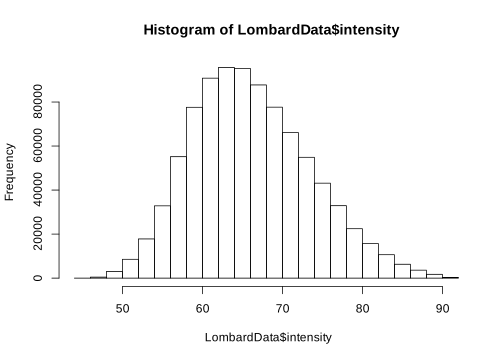
hist()computes a histogram of the given parameter.
From the previous analyses, we don’t see great deviation from normality in the intensity distribution, and we also observe that the dataframe contains also data about pitch. Although it’s not necessary, here will subset the data to illustrate how it’s done.
dataframe[,c(1:n)]returns all the rows of dataframe in columns 1:n.
We’re interested in the intensity level differences between silent and noisy background periods. A plot could help us to see if these differences are obvious:
par(mfrow=c(2,1))
LombardSpeech = subset(intensityData, condition == 'noise')
hist(LombardSpeech$intensity)
QuietSpeech = subset(intensityData, condition == 'silence')
hist(QuietSpeech$intensity)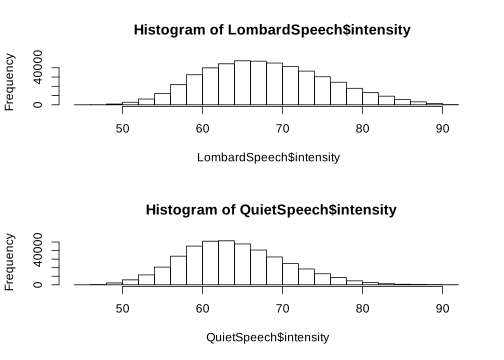
par()is used to set graphical parameters. In this case, we want to have a figure with subplots in two rows and a single column.
There are some visible differences between the two distributions, but we want to know if such differences are significant. Let’s use a RM-ANOVA for that, as implemented in the ez library.
ezANOVA() is the function in the ez library used to compute RM-ANOVA. Some useful parameters
of this function are:
dv: the dependent variable (intensity)wid: the subjects (speaker)within: the within-subject factors considered in this analysiswithin_full: all the within-subject factors in the modelbetween: the between-subject factorstype: the type of SS (III)
NOTE: R provides Type I sequential SS (sums of squares), not the default Type III (a.k.a marginal) SS reported by SAS and SPSS. “The decision about which type of sums of squares to use is based on the question whether it is reasonable to report main effects in the presence of an interaction.”1 So, please consider carefully whether or not to use Type III SS.
One way to use type III marginal sum of squares is to run the following code:
Alternatively, in ezANOVA() is possible to specify the type of SS as shown here
levAoV = ezANOVA(data= intensityData,
                     dv=.(intensity),
                     wid=.(speaker),
                     within=.(condition,goal,comm),
                     type = 3)
## Warning: Collapsing data to cell means. *IF* the requested effects are a
## subset of the full design, you must use the "within_full" argument, else
## results may be inaccurate.- Note how most
ezANOVA()parameters need to be surrounded by.(). - We read the warning and realize that it doesn’t apply to our case.
Let’s read the results of the analysis:
## $ANOVA
##                Effect DFn DFd       F        p p<.05      ges
## 2           condition   1   8 151.281 1.78e-06     * 0.248523
## 3                goal   1   8   1.929 2.02e-01       0.020121
## 4                comm   1   8  30.131 5.81e-04     * 0.393776
## 5      condition:goal   1   8   0.343 5.74e-01       0.000214
## 6      condition:comm   1   8  15.028 4.70e-03     * 0.011409
## 7           goal:comm   1   8   0.591 4.64e-01       0.005829
## 8 condition:goal:comm 1 8 7.797 2.35e-02 * 0.003887print(x)is a generic function in R that outputs in console the contents of x.
The table above comprises the effect name, degrees of freedom in the numerator (DFn) and denominator (DFd), results of the F-statistcs, p-values, whether they are significative at a confidence of 95%, and generalized eta-squared values (the size of the effect).
There are many ways to report these results, I use APA style, so they should read somewhat like:
As summarized in Table 8.2, background condition, and communication effort were found to have a large effect (Cohen 1992) on speech intensity.2 Their interaction had small but significant effect as well along with the triple interaction between goal orientation, background condition, and communication effort. The effects of goal and other interactions were not signficant.
| Effect | Statistics | p-value | \(\eta_{G}^2\) |
|---|---|---|---|
| condition | F(1,8) = 151.281 | <.001 | .249 |
| goal | F(1,8) = 1.929 | .202 | .020 |
| comm | F(1,8) = 30.131 | <.001 | .394 |
| condition:goal | F(1,8) = 0.343 | .574 | .000 |
| condition:comm | F(1,8) = 15.028 | .004 | .011 |
| goal:comm | F(1,8) = 0.591 | .464 | .006 |
| condition:goal:comm | F(1,8) = 7.797 | .023 | .004 |
We can further investigate the interactions by plotting them:
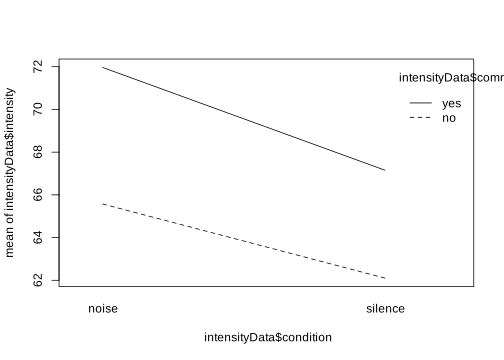
interaction.plot(x,y)creates a plot of a two-way interaction between x and y.
In general, after establishing the probabilities of having significant differences, one
should run a post-hoc analysis to find out where these differences are located. The function
ezStats() is useful to create a table with the descriptive analysis:
effectDescript = ezStats(data= intensityData,
                           dv=.(intensity),
                           wid=.(speaker),
                           within=.(condition,goal,comm),
                           type = 3)
## Warning: Collapsing data to cell means. *IF* the requested effects are a
## subset of the full design, you must use the "within_full" argument, else
## results may be inaccurate.## condition goal comm N Mean SD FLSD
## 1 noise no no 9 64.4 4.31 0.758
## 2 noise no yes 9 71.2 3.50 0.758
## 3 noise yes no 9 65.5 5.28 0.758
## 4 noise yes yes 9 72.1 3.56 0.758
## 5 silence no no 9 60.4 3.52 0.758
## 6 silence no yes 9 66.6 2.48 0.758
## 7 silence yes no 9 62.6 4.61 0.758
## 8 silence yes yes 9 66.7 3.21 0.758Note that the syntax for ezStats() is very similar to that of ezANOVA(). The resulting
table shows the number of participants N, means and standard deviations, and Fisher’s
Least Significant Difference (FLSD). The latter is a way to detect significant differences
levels: If the FLSD for two levels overlap, there’s no significant difference between them.
This is easier to see with a plot:
ezPlot(data= intensityData,
         dv=.(intensity),
         wid=.(speaker),
         within =.(condition,goal,comm),
         x = condition,
         split = goal,
         col = comm)
## Warning: Collapsing data to cell means. *IF* the requested effects are a
## subset of the full design, you must use the "within_full" argument, else
## results may be inaccurate.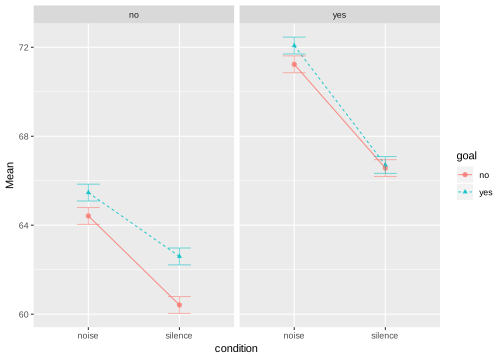
ezPlot() also has a similar syntax than that of ezANOVA(), but adds some parameters to
specify the way the plot is displayed: x defines the abscissa, and col column panes for
levels of the given factor (i.e., comm) (we could also have used row that works in a
similar fashion); split let us overlap on factor in the same pane.
Frankly, the above plot looks unappealing:
- Gray background is sometimes inconvenient
- Legend on the right takes space of the plot
- Fontsize can be too small to include in a manuscript
- Colors could also be problematic for publishing
Luckily, ezPlot() returns a ggplot() kind of plot and we can address the aforementioned
issues. As previously demonstrated, R has plotting routines but their syntax may be sometimes
cumbersome. ggplot2 provides a different set of routines with simpler syntax and better
results.
p = ezPlot(data= intensityData,
                dv=.(intensity),
                wid=.(speaker),
                within =.(condition,goal,comm),
                x = condition,
                split = goal,
                col = comm)
## Warning: Collapsing data to cell means. *IF* the requested effects are a
## subset of the full design, you must use the "within_full" argument, else
## results may be inaccurate.p = p+
scale_shape(solid = FALSE)+
scale_colour_grey(start = 0.0, end = 0.2)+
theme_bw()+
labs(title="Communication effort",
x="Background condition",
y = "Mean intensity (dB)",
shape = 'goal')+
theme(legend.position="bottom")+
theme(
plot.title = element_text(size = .6 * textSize, hjust = 0.5),
axis.text.x= element_text(size = .6 * textSize),
axis.text.y= element_text(size = .6 * textSize),
axis.title.x= element_text(size = .6 * textSize,vjust = 0.1),
axis.title.y= element_text(size = .6 * textSize,angle = 90,vjust = 1.1),
strip.text.x = element_text(size =.6 * textSize),
legend.title = element_text(size =.6 * textSize),
legend.text = element_text(size = .6 * textSize))+
guides(color = F, shape = F)
p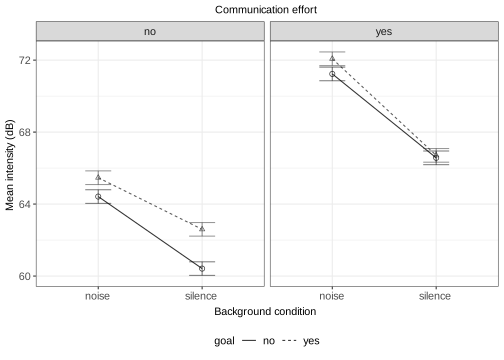
A full description of the plotting possibilities brought by the ggplot2 library is out of
the scope of this workshop. Those interested in learning more about this library are referred
to its vignette https://cran.r-project.org/web/packages/ggplot2/ggplot2.pdf, and I find handy
this cheatsheet https://raw.githubusercontent.com/rstudio/cheatsheets/main/data-visualization.pdf.
8.2.5 Conclusion
Regarding the example study, it seems that communication effort increases the overall speech intensity level, in the same way that the presence of background noise did. Significant level differences were found for combinations of background masker, communication effort, and goal orientation, except when the background was quiet for communication effort tasks.
This concludes the demonstration of how to use R and the ez library to carry out RM-ANOVA. RM-ANOVA is a good tool to do this kind of analysis, but it’s fragile regarding sphericity. Other tools such as Linear Mixed Effects (LME) offer an alternative analysis.
References
Villegas, Julián, Ian Wilson, and Jeremy Perkins. 2015. “Effect of Task on the Intensity of Speech in Noisy Conditions.” In Proc. Acoust. Soc. Japan, Autumn Meeting. Aizu Wakamatsu, Japan.
Mangiafico, Salvatore S. 2016. Summary and Analysis of Extension Program Evaluation in R, Version 1.13.6. New Brunswick, New Jersey: Rutgers Cooperative Extension.
Cohen, Jacob. 1992. “A Power Primer.” Psychological Bulletin 112 (1). American Psychological Association: 155.
http://myowelt.blogspot.jp/2008/05/obtaining-same-anova-results-in-r-as-in.html↩
\(\eta_{G}^2\) gives a measure of the effect size. Its interpretation is somewhat arbitrary, see https://en.wikiversity.org/wiki/Eta-squared↩